Gateway 在接受 Control UI 连接之前拒绝了此页面来源。
- 将此浏览器来源添加到 gateway.controlUi.allowedOrigins.
- 使用完整来源, 如 http://localhost:5173, 而不是通配符模式。
- 更改允许的来源后,请重启或重新加载 Gateway。
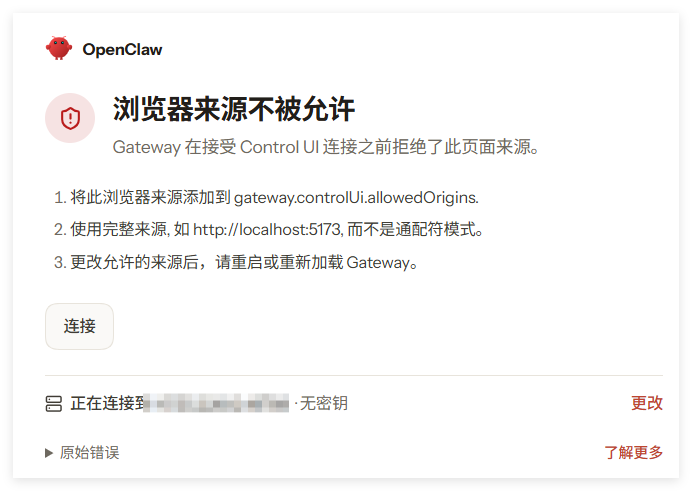
原始错误:origin not allowed (open the Control UI from the gateway host or allow it in gateway.controlUi.allowedOrigins)
解决:
打开 openclaw 的配置文件: openclaw.json
找到 gateway 的 allowedOrigins
添加访问地址:
“controlUi”: {
“allowedOrigins”: [
“http://localhost:18789”,
“http://127.0.0.1:18789”,
“http://公网IP:18789”
]
},
重启服务:sudo openclaw gateway restart
原创文章,作者:云东方,如若转载,请注明出处:https://www.yundongfang.com/Yun861.html